Summary:
This article is for fixing the endless reboot loop after windows 10 update. So, if you are encountering such an issue in your Windows PC after Windows 10 update then this blog will gives you the perfect solution to fix this Endless Reboot Loop issue. Only you just need take a look over the complete post.
Practical Scenario:
My Acer laptop is stuck in a boot loop. Its boots to the Acer splash screen with dots spinning in a circle, turns off, then boots to that screen again over and over again. It hasn’t been updated in about a year as the screen got broken and I only recently got the cash for a repair. It was initially Windows 8 but I installed Windows 10 as soon as it was available. The computer has restarted over 10 times now and it won’t go into automatic recovery either. How can I fix this? Can anyone help me?
About Windows 10 Boot Or Restart Loop Error
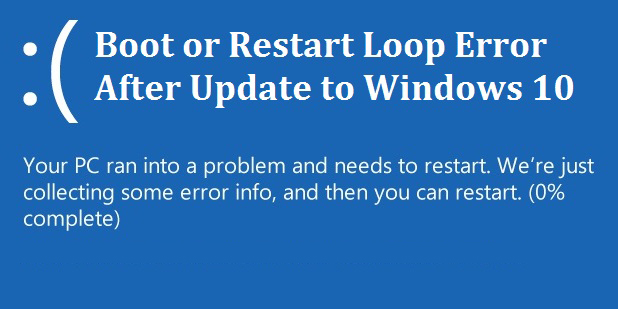
Windows 10 reboot loop is a very annoying problem reported by the Windows users. It doesn’t matter if you updated to Windows 10 from Windows 7, 8, 8.1 there are ample chances that user gets stuck in infinite reboot loop. It is the annoying problem and know what are the causes this reboot loop and crash loop on Windows 10 Update.
Screenshot of the error:
What Causes Windows 10 Boot Or Restart Loop Error?
The third update of Windows 10 is causing Windows 10 PC/laptop to crash again and again. The latest Windows 10 update KB3081424 fails during the update process and shows the message: We couldn’t complete the updates, undoing the changes.” This undoing will cause a mandatory system reboot and when you log back on Windows 10 update will try to install KB3081424 again. Windows 10 updates cannot be stopped KB3081424 and this leaves system stuck in endless reboot loops.
Also Read:
7 Easy Tricks to Fix INTERNAL_POWER_ERROR BSOD Error on Windows 10/8/7
This KB3081424 update ultimately fails and the initial failure will be found to create the bad entry in registry keys of Windows 10. And this will subsequently attempt to reinstall from working correctly. So know how to fix the Reboot Loop problem during or after Windows 10 update.
How To Fix Endless Reboot Loop problem After Windows 10 Update?
Workaround #1:Check For Windows Update
To fix the endless Reboot Loop problem during or after Windows 10 update on your PC/laptop updates your Windows PC with the latest Microsoft released the update to fix the issue. You can get it fixed through Windows Update. Just follow the steps:
- Open Settings and move to Update and Security.
- After that select “Check for updates”.
- Now additional update will be downloaded and installed on the Windows 10 PC/laptop to fix the endless reboot loop.
Hopefully, this will fix the reboot loop problem, but if not then make use of the below-given solutions.
Workaround #2: Disable Automatic Restart
Step 1:
At the time of restarting up your PC continuously keeps on pressing the F8 until you get Windows logo on screen.
Step 2:
When the boot menu appears on your screen, stop pressing the F8 and select Safe Mode.
Step 3:
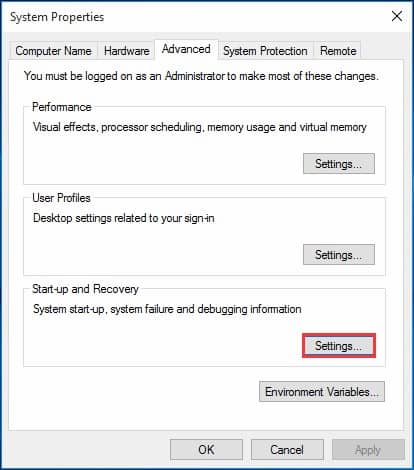
This will open the Windows Boot screen into Safe Mode. Go to search box and type “sysdm.cpl”. Open sysdm.cpl from search results.

Step 4:
Search to “Advanced” tab and choose “Settings” within “Start-up and Recovery”.
Step 5:
Uncheck the “Automatically restart” check box. You might also want to check “Write an event to the system log” if it’s not already checked.

Click “OK” and again restart your PC.
It’s the first step you need to try whenever you get stuck in such reboot loop situation. if process won’t help you to solve the windows 10 restart loop issue then try out the second method.
Workaround #3: Fix Bad Registry entries:
To fix the problem, you need to fix the registry keys during or after Windows 10 upgrade.
Note: Manipulating registry entries is quite risky and difficult too as this adversely affect your PC/laptop. So it is recommended to make use of the automatic Registry Repair tool, to fix the error.
Helpful article: How to detect and fix registry errors?
Manual steps to fix registry entries errors:
Step 1: First type “regedit” in the Start menu
Step 2: In the appeared window navigate to:
HKEY_LOCAL_MACHINE\SOFTWARE\Microsoft\Windows NT\CurrentVersion\ProfileList
Step 3: Now create a valid backup of your registry key as manipulating is quite risky or else create a System Image Backup:
Step 4: After creating the valid backup and close regedit reboot.
This will fix the problem and the KB3081424 should now install correctly. But if not then check then you need to check as this must be driver problem:
Workaround #4: Fix Driver Issues
If you are unable to update your Windows then this must be the problem related to graphic driver’s card. If your PC stuck in endless reboot loop after Windows 10 update finished, then this might be the driver issue as the AMD graphic card clash with Windows 10.
This might caused due to corrupted or damaged driver or the installed drivers are incompatible or outdated.
Helpful article: Fix Display/Video/Graphics Issues after Windows 10 Update
So, if the issue is related to graphic card drivers then you need to download the graphic drivers from the manufacturer’s website and fix the issue of various graphic card drivers. You can also make use of the Driver Booster to update the driver manually and to fix any of the driver issues and .
Recommended Option To Fix Boot OR Restart Loop Error
After performing the above-given steps you can make use of Windows Repair Tool to scan and detect various issues in Windows 10. It is designed with the advanced algorithm that it detects the damaged Windows files and also helps to restore your PC and repairs various Windows update error. It also improves the performance of your Windows PC. This tool can fix DLL error, PC error, Hard Drive error, Registry error, Application error, games error and many others.